|
Untitled Document
PSX-1: Personal Audio Video Server for the MX-6000
Extraordinary Automation
iPod docks just put files on a TV. Only URC's PSX-1 adds the exciting features that turn your iPod into a true Personal Server. 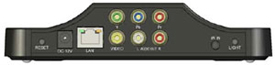 Everything you’ve downloaded, from podcasts to music videos, movies and TV shows is selectable on the screen of the MX-6000. Everything you’ve downloaded, from podcasts to music videos, movies and TV shows is selectable on the screen of the MX-6000.
The secret to the unique PSX-1 is the storage drive. The PSX-1 doesn’t have one. Instead you insert an iPod (even a visiting friend’s) into the docking connector. The PSX-1 includes PSXLink software for both Macs and PCs. Any new content you add to your iTunes library can be synchronized to the iPod in the PSX-1 without ever removing it.
Of course, a single MX-6000 can control any number of PSX-1s. So if your family has a number of iPods, you may choose to install multiple PSX-1s, one for each family member. Conveniently, the PSX-1 has a customizable label on the front and docks magnetically with another PSX-1 beside it.
Once you touch the unique personal server features, the difference between looking at endless lists and the revolutionary automation of the PSX-1 becomes extraordinarily attractive. At last, complicated actions are simple and intuitive. PSX-1 makes it easy to explore your large collection in previously impossible ways.
Explore Your Content: Shuffle Exactly What You Feel Like Listening To
With other music servers, shuffle is a frustrating mix of too many kinds of music. With the PSX-1, shuffle becomes a powerful tool for listening and exploring your music collection.
Imagine shuffling just your jazz, or just the songs of a particular artist. You can shuffle play any genre, any artist or any album at any time by simply accessing the MX-6000’s shuffle screen.
Arranging the perfect music to playback for any event is a delightful activity with the PSX-1. You can freely play music, browsing and shuffling as you like. When you hear something you’d like to add to your Jukebox playlist, simply touch “Add Song to Jukebox” or “Add Album to Jukebox” on the Jukebox screen. To play the jukebox you’ve created, simply touch “Play Jukebox”.
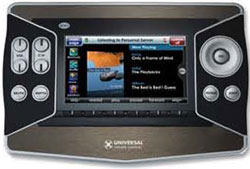
Complete Editing Control
At any time, you can choose to View the Jukebox. When viewing the Jukebox, new controls appear that allow you to change the order of the songs in the list, delete or search for new items to add. Of course, at any time you can clear the entire Jukebox playlist and start again.
Search for Any Artist, Album or Song
The “search” button appears in the upper right whenever you are looking at a Menu or Jukebox screen. Once you click on Search, an alphabetical keyboard appears. Simply type in as many letters as you like, then touch “Go.” You can enter characters using a number, qwerty, or alphabetic keyboard
Both Composite and HD Component Video
The PSX-1 is equipped with installer selectable Composite and HD quality Component Outputs to match the output of your iPod.
Specifications
- Size: 6.75” x 5” x 1.6” (W x D x H)
- Weight: 13.5 oz
- Memory: Microcontroller: 166MHz ARM922T
Flash memory: 16Megabit
RAM: 64Megabit SDRAM
- Range: IR (line of sight) -20-30’ depending on the environment.
- IR Flasher: Rear Panel IR Input: Compatible with all MRF and MSC base stations
- PC Interface: Ethernet: 10Base-T/100Base-TX network connector
- Power Supply: 12V DC (minimum 650 Milliamp wall adapter required)
- Network: 10Base-T/100Base-TX network connector
- Video: 1 RCA Composite video output connector
3 RCA Component video output connectors (Y/Pr/Pb)
- Audio: 2 RCA audio output connectors (L + R)
- Warranty: 1 year parts & labor when purchased from an authorized dealer
|
|