|

DIGITAL SIGNAGE OPTIONS
COMMERCIAL TVs & MONITORS HERE
 |
 |
 |
 |
| LG SUPERSIGN |
IADEA - WIRED |
IADEA - WIRED
& WIRELESS |
IADEA - WIRED
& WIRELESS +AV |
OPTION #1 LG

LG SuperSign TV is an innovation in digital signage that can entertain while maximizing the impact of your message.
LG SuperSign TV is a digital signage TV made simple. It’s the perfect solution for small or medium-sized businesses that need a straightforward, eye-catching and effective way to communicate with their target audience.
- BRIGHTNESS 300NIT
- BUIT-IN TV TUNER
- BUILT-IN SPEAKER
Download SuperSign TV Editor Software HERE
_____________________________________________________________________________________________
OPTION 2
IAdea Digital Signage Player Support Page
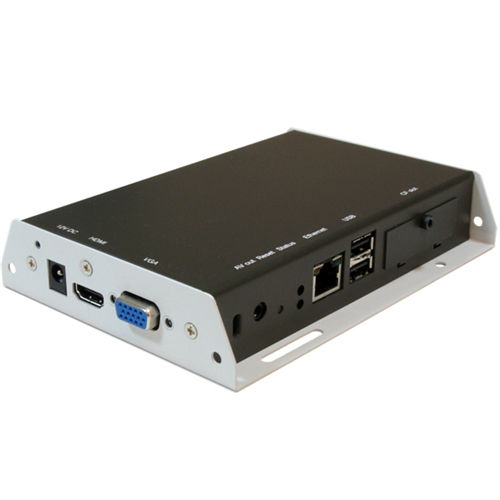
The IAdea players sold by Volutone come pre-configured for SignChannel, out of the box. During Q1 of 2012 Volutone will begin selling full year subscriptions of SignChannel. Using SignChannel, network configuration of your player is as simple as plugging in an ethernet cable and uploading slides and videos are as simple as adding content to Facebook. To see SignChannel in action, visit any Volutone location. Our players are supported by SignChannel.
IAdea players can also be updated via IP using the free software from IAdea. This software can be obtained from a Volutone location or direct from the IAdea support site. See instructions below. Using the IAdea supplied software, one can drag and drop slides and videos direct to the player. By adding the optional GPIO board one can configure mulitple playlists which can be triggered by any of the 10 available playlist triggers. The GPIO board also offers 4 input triggers. The 10" pictureframe player has 4 built in buttons that can be utilized if configured.
When updating via IP one should disable the SignChannel settings on the player. Using a USB keyboard (the setup menu appears when you insert a USB keyboard) navigate to the content menu and delete the SignChannel settings, and save.
Bonus: Content on the player begins playing instantly after bootup in case of power failure.
Step 1
Create a free account on the IAdea.com support page
http://www.iadea.com/support/user/register
Step 2
Download software, manuals or training
http://www.iadea.com/support/content/where-can-i-download-latest-version-adfotain-manager-express
Step 3
For EASY conversion of videos to IAdea Players format
http://www.iadea.com/support/content/converting-videos-winmenc
Step 4 *optional if you are using the HTML5 features
Go to the firmware tab to download the latest firmware for HTML5
Step 5 *optional for full player details
Go to the Documentation tab to download the full manuals for each player
For implentation planning and technical support, contact your nearest Volutone sales team
http://www.volutone.com/ContactUs.aspx
|